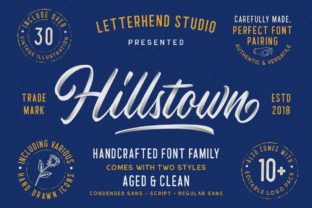
Hillstown: A Friendly, Modern Script Font That Delivers Charm—Without the Compromises
If you’ve ever scrolled through font libraries searching for something that feels personal but polished, warm but professional, Hillstown likely caught your eye. It’s a modern script font designed with intention—not just flourishes, but rhythm, balance, and readability built into every curve. Unlike many script fonts that sacrifice legibility for style or feel overly decorative in real-world use, Hillstown bridges the gap between expressive handwriting and functional typography. That’s why designers, small business owners, educators, and content creators consistently choose it for logos, social graphics, invitations, course materials, and even product packaging.
Why People Reach for Hillstown (and Why Some Regret It Later)
Hillstown stands out because it avoids two common pitfalls: excessive contrast (which breaks up letterforms at small sizes) and rigid uniformity (which makes scripts feel robotic). Its lowercase letters have gentle variation in stroke weight and subtle bounce—enough to feel human, not chaotic. But here’s where things go sideways: many users treat Hillstown like a “drop-in replacement” for any heading or logo without adjusting spacing, sizing, or context. That leads to disappointment—not because Hillstown is flawed, but because it’s misunderstood.
Mistake #1: Ignoring Letter Spacing in Practical Applications
Script fonts rely heavily on consistent spacing to maintain flow. Hillstown includes well-designed kerning pairs, but default tracking in design tools often adds too much space between letters—especially in all-caps or short words like “Studio” or “Bakery.” The result? A disconnected, stilted look that undermines its natural charm.
Better approach: Manually tighten tracking by 5–15 units (depending on size) for headlines under 48pt. For web use, test how it renders across browsers—some default letter-spacing values can override your design intent. Always preview at actual display size, not just in your editor.
Mistake #2: Using Hillstown Where Clarity Trumps Character
Hillstown shines in contexts where personality matters: a boutique’s welcome banner, a handmade soap label, an Instagram story announcing a workshop. It falters when forced into dense body copy, data tables, or legal disclaimers—even at larger sizes. Its connected script structure slows reading speed, and its modest x-height reduces legibility below 24pt in print or 18px online.
Better approach: Reserve Hillstown for primary branding elements and short, high-impact text. Pair it intentionally—e.g., with a clean sans-serif like Inter or Lato for supporting text. If your project needs both warmth and utility, use Hillstown for headings and a complementary neutral font for everything else. This isn’t a limitation—it’s smart hierarchy.
Mistake #3: Assuming All “Hillstown” Files Are Equal
You’ll find Hillstown listed on several platforms—but not all versions are identical. Some free downloads lack OpenType features like stylistic alternates, ligatures, or true small caps. Others bundle outdated character sets missing extended Latin or diacritical marks needed for multilingual projects (e.g., Spanish, French, or Vietnamese clients).
This becomes obvious only after you’ve designed a client’s menu or ebook—and discover the accented “é” or “ñ” defaults to a generic fallback font, breaking visual consistency.
Better approach: Download Hillstown directly from the original foundry or a trusted marketplace like Creative Market or MyFonts. Check the specimen sheet for language support, OpenType features, and licensing scope—especially if you’re using it commercially (e.g., in a Shopify theme or client’s brand guidelines). A $29 license with full language coverage and updates is often more cost-effective than reworking designs later.
What to Check Before You Commit
Before adding Hillstown to your toolkit—or recommending it to a client—take three quick checks:
- Test real content, not just “The quick brown fox…” Type your actual headline or brand name. Does “Café & Co.” flow smoothly? Does “Jenny’s Art Studio” feel balanced—or does the double “t” create awkward tension? Try alternate glyphs if available.
- Preview at multiple sizes and weights. Hillstown typically comes in one weight (regular), so don’t assume bold variants exist. If you need emphasis, use color, size, or layout—not faux bolding, which distorts curves and harms rendering.
- Verify licensing for your use case. Personal use ≠ commercial use. Embedding in apps, PDFs, or SaaS platforms often requires extended licenses. When in doubt, read the EULA—not just the marketing description.
A Realistic Example: From Misstep to Refinement
A freelance educator named Maya chose Hillstown for her online course landing page because it “felt welcoming.” She used it for the main headline, subhead, and even bullet points—then noticed sign-up conversions dropping. Heatmaps showed users skipping the value section entirely. Turns out, the script font made key benefits (“Lifetime access,” “Downloadable worksheets”) harder to scan quickly.
She revised: kept Hillstown for the headline (“Creative Writing Unlocked”), switched to a friendly sans-serif for subheads and bullets, and added subtle line breaks to improve rhythm. Conversion rose 22%—not because the font changed everything, but because she matched the tool to the task.
Final Thought: Hillstown Is a Choice, Not a Shortcut
Hillstown doesn’t promise effortless elegance. It rewards thoughtful application. Its charm emerges when you honor its strengths—organic flow, quiet confidence, approachable sophistication—rather than stretching it beyond its natural range. Whether you’re launching a side hustle, designing a classroom poster, or refreshing your portfolio, ask yourself: Does this text need to feel handwritten—or just human? If the answer is the latter, Hillstown is worth your time. Just give it room to breathe, pair it wisely, and test early.
When used with awareness—not just attraction—it becomes more than a font. It becomes part of your voice.