Onboard: A Smooth Script Font That Elevates Real-World Design Projects
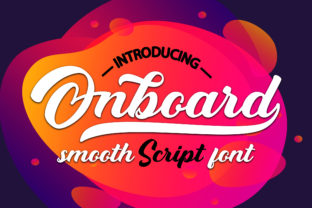
When you're crafting a brand identity, designing marketing materials, or refining a website’s visual voice, typography isn’t just decoration—it’s communication. Onboard is a smooth script font designed with intention: it balances playfulness and professionalism, offering the warmth of hand-drawn lettering without sacrificing clarity or versatility. Unlike overly ornate scripts that struggle at small sizes or in digital interfaces, Onboard delivers legibility, rhythm, and personality—making it a practical choice for designers, marketers, small business owners, and content creators who need type that works *with* their goals—not against them.
Why Designers and Brands Reach for Onboard
Many professionals face recurring challenges when selecting script fonts: they’re either too formal to feel approachable, too casual to convey credibility, or technically unsuited for responsive layouts and multi-channel use. You might be launching a boutique skincare line and need packaging text that feels personal yet polished—or building a wedding invitation suite where elegance and emotion must coexist. Perhaps you’re updating your freelance portfolio site and want headlines that reflect your creative energy without distracting from your work.
Onboard bridges these gaps. Its gently tapered strokes, consistent baseline flow, and open letterforms ensure readability across devices—from mobile screens to printed brochures. It doesn’t shout; it invites. And because it’s built with modern OpenType features—including ligatures and contextual alternates—it adapts gracefully to different contexts, giving subtle nuance without manual tweaking.
Real Applications Where Onboard Makes a Difference
Practicality matters. Here’s how Onboard supports real-world outcomes:
- Brand Identity Systems: Paired with a clean sans-serif (like Inter or Poppins), Onboard adds expressive contrast—ideal for logos, wordmarks, or taglines. A local café might use Onboard for its name and a neutral typeface for menu items, creating instant warmth while maintaining scannability.
- Digital Marketing Assets: Email headers, social media banners, and landing page hero text benefit from Onboard’s human rhythm. Unlike rigid display fonts, it conveys authenticity—helping audiences connect emotionally before they even read the first sentence.
- Printed Collateral: From business cards to product labels, Onboard scales well. Its moderate x-height and generous spacing prevent ink bleed on uncoated paper, and its smooth curves reproduce cleanly in both offset and digital print.
- Web Typography (with care): When used as a display font—never body text—Onboard enhances hierarchy and tone. Pair it with system-safe fallbacks or web font hosting services like Google Fonts (if available) or self-hosted solutions using
@font-face. Always test loading performance and provide graceful fallbacks.
How Different Users Can Leverage Onboard Effectively
Your relationship with Onboard depends on your role—and your resources.
For solo creatives and small business owners: You likely wear many hats—designer, writer, marketer. With Onboard, you get a tool that requires minimal technical setup but delivers maximum visual impact. Use it consistently across your Instagram bio, Canva templates, and email signature to reinforce recognition. Avoid overusing it—reserve Onboard for moments where tone matters most: headlines, quotes, call-to-action buttons, or short brand statements.
For in-house designers and agencies: You’re balancing brand guidelines, accessibility standards, and cross-team collaboration. Onboard integrates smoothly into design systems when paired with accessible color contrast (minimum 4.5:1 against background) and clear typographic hierarchy. Consider defining usage rules—e.g., “Onboard is permitted only for H1 and branded quote blocks”—to maintain consistency without stifling creativity.
For developers and UX writers: Typography affects perceived trust and usability. While Onboard isn’t suited for interface labels or form fields, it excels in microcopy that benefits from emotional resonance—like a friendly onboarding message (“Welcome aboard!”), a celebratory success banner, or a personalized dashboard greeting. Ensure proper font loading strategies and always verify screen reader compatibility by keeping decorative uses truly decorative (i.e., not conveying critical information).
Key Considerations Before You Implement Onboard
Even the most versatile script font has boundaries—and recognizing them helps you get better results faster.
- Avoid using Onboard for body copy or long paragraphs. Its connected, flowing nature slows reading speed and reduces comprehension. Save it for emphasis, not exposition.
- Test contrast rigorously. Light-weight variants may fade on light backgrounds; bold weights can overwhelm. Always preview in real conditions—not just mockups.
- Respect licensing. Verify whether your intended use (e.g., SaaS platform integration, client deliverables, merchandise) falls within the license terms. Some versions allow commercial use; others require extended licenses for app embedding or unlimited redistribution.
- Think beyond aesthetics—consider tone alignment. Does Onboard match your audience’s expectations? A fintech startup targeting enterprise clients may find it too informal; a children’s book publisher or artisanal goods brand will likely embrace its charm.
Getting Started with Onboard—Simple, Strategic, Sustainable
You don’t need advanced typography training to benefit from Onboard. Start small: pick one high-impact application—like redesigning your newsletter header or refreshing your LinkedIn banner—and apply Onboard there. Observe how it changes perception. Does it make your message feel more inviting? More memorable? More *you*?
Then expand deliberately. Build a simple pairing guide: “Onboard + Montserrat for headings; Onboard + Lato for subheads.” Keep a style reference sheet with approved sizes, weights, and spacing rules—especially if others contribute to your brand assets.
Finally, remember that great typography serves people—not trends. Onboard stands out because it’s both expressive and engineered for function. It doesn’t chase novelty; it solves problems: how to feel human in digital spaces, how to stand apart without shouting, how to build familiarity through thoughtful detail.
Whether you’re refining a logo, launching a product, or simply wanting your communications to resonate more deeply, Onboard offers a smooth, reliable way to bring warmth, clarity, and quiet confidence to every project you touch.