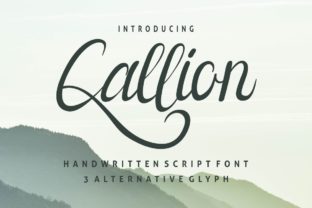
Callion: A Handwritten Font That Fits Real Workflows
Callion is a classic handwritten font that combines elegance and personality into one beautiful script. It’s not just decorative—it’s functional. Designed with natural stroke variation, subtle flourishes, and consistent spacing, Callion bridges the gap between expressive handwriting and professional legibility. Unlike many script fonts that sacrifice readability for flair, Callion maintains clarity at sizes as small as 14pt in body text—making it viable for more than just headlines or logos.
Where Callion Fits in Your Creative and Professional Process
Fonts are rarely chosen in isolation. They’re selected as part of a broader decision chain: defining brand voice, preparing deliverables, finalizing client assets, or refining a presentation. Callion enters that chain most effectively when you’re balancing authenticity with polish—when you need something human-sounding but still trustworthy.
For example, a freelance educator designing an online course workbook might use Callion for section headers and quote callouts—not to mimic handwriting, but to signal warmth and approachability. A small business owner updating their email newsletter might apply Callion to subject lines or CTA buttons, pairing it with a clean sans-serif like Inter or Open Sans for body copy. In both cases, Callion isn’t the foundation—it’s the intentional accent that supports tone without overwhelming function.
Using Callion Before, During, and After Key Tasks
Before a project: When planning visual assets—like a pitch deck, product launch kit, or workshop handout—include Callion in your early mockups. Its presence helps test whether your intended tone (friendly yet refined, personal yet professional) lands before investing time in full design execution. If stakeholders respond positively to the feel of Callion in those early visuals, you’ve validated a stylistic direction early—and avoided last-minute font swaps that disrupt layout consistency.
During execution: Use Callion where emphasis matters—not everywhere. Apply it selectively: to pull quotes in blog posts, signature lines in branded PDFs, or handwritten-style labels in Notion dashboards. Avoid using it for long paragraphs, data tables, or forms requiring quick scanning. Its strength lies in momentary impact, not sustained reading.
After delivery: Consider how Callion performs across devices and platforms. It renders well in modern browsers and most design tools (Figma, Adobe Creative Cloud, Canva), but may require fallback handling in email clients or legacy CMS templates. If you’re embedding Callion via @font-face, always declare a system font fallback (e.g., “cursive”) to preserve hierarchy if loading fails. This isn’t just technical hygiene—it’s part of delivering a reliable experience.
Compatibility and Practical Integration
Callion works best alongside tools and methods that value intentionality over automation. It pairs naturally with systems that support custom typography: Figma for collaborative design, Notion for internal documentation (via custom CSS snippets), or Webflow for no-code site building. It also integrates cleanly into print workflows—especially when exporting from Illustrator or InDesign with proper font embedding enabled.
However, avoid forcing Callion into environments where control is limited. For instance, standard Google Docs doesn’t support custom font uploads, so using Callion there requires workarounds (like inserting SVG text blocks), which break editing flow. Similarly, basic email builders often restrict font choices to web-safe sets—so reserve Callion for platforms where you control the stack.
A practical tip: Create a reusable style guide snippet that defines exactly *how* and *where* Callion should appear in your projects. Example:
- Headers only — H2 and H3 in web content, never H1 or body text
- Signature elements — Email footers, certificate borders, worksheet titles
- Never used for — Navigation menus, form fields, data labels, or mobile buttons smaller than 16px
This kind of specificity prevents inconsistent usage and saves time during review cycles.
Workflow Examples Across Roles
For marketers: When A/B testing landing page variants, swap only the headline font—keeping all other variables identical. Try Callion versus a neutral serif. Track bounce rate, time-on-page, and conversion. You’ll quickly learn whether its personality increases engagement for your audience—or distracts from your core message.
For educators: Use Callion in slide decks to highlight learning objectives (“By the end of this module, you’ll be able to…”) or reflection prompts (“What surprised you today?”). Its handwritten quality softens directive language, making outcomes feel collaborative rather than prescriptive.
For freelancers: Embed Callion in proposal PDFs for your name in the cover letter signature and section dividers. It adds polish without looking generic—and subtly reinforces your attention to detail. Just ensure the font is embedded (not outlined) so clients can copy contact info if needed.
For small business owners: Print Callion on packaging inserts, thank-you cards, or QR code labels linking to video tutorials. Because it feels personal, it raises perceived value—even when the production cost is unchanged.
Long-Term Usability and Quality Control
Fonts age. Trends shift. But Callion’s design avoids extremes—no excessive swashes, no exaggerated contrast, no forced irregularity. That makes it less likely to feel dated in 18 months. Still, revisit your usage every 6–12 months: Does it still align with your brand evolution? Is it performing as expected in analytics or user feedback?
Consistency matters more than frequency. One well-placed Callion element per document or interface is stronger than five scattered uses. Train team members to recognize appropriate contexts—perhaps by saving approved Callion examples in a shared asset library with clear usage notes.
Also consider accessibility. While Callion passes basic WCAG contrast checks at larger sizes, avoid relying on it alone for critical information. Pair it with sufficient color contrast (at least 4.5:1 against background), generous line spacing (1.4–1.6), and always provide alt text for any image-based Callion text used in social or email graphics.
Getting Started Without Overcomplicating It
You don’t need a full rebrand to begin using Callion meaningfully. Start small:
- Pick one recurring asset—like your weekly team update email—and apply Callion to the greeting line (“Hi team,” or “Good morning!”).
- Test it for one month. Note whether recipients comment on tone, forward the email more often, or engage faster with linked content.
- Expand only if the experiment yields positive signals—not just aesthetic preference, but measurable workflow alignment.
This iterative approach respects your time and reduces risk. It also builds internal fluency: the more your team sees Callion used purposefully, the more naturally it gets adopted elsewhere.
Remember: Callion isn’t about adding decoration. It’s about reinforcing intent—humanizing interfaces, softening directives, and signaling care in execution. When used with restraint and awareness, it becomes part of your operational rhythm, not just another design choice.
Its value emerges not in isolation, but in how smoothly it connects to what comes before and after—the brief you reviewed, the tool you opened, the feedback you received, the next step you’ll take. That’s where Callion earns its place: not as a flourish, but as a functional part of getting real work done, well.