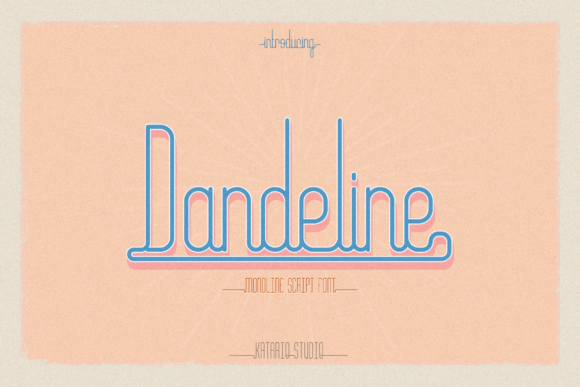
Dandeline: A Handwritten Font That Fits Seamlessly Into Real Creative Workflows
Dandeline isn’t just another decorative font—it’s a deliberate tool for designers, marketers, educators, and small business owners who need authenticity without sacrificing clarity. With its soft, slightly uneven letterforms and subtle vintage texture, Dandeline delivers warmth and personality while remaining highly legible at medium to large sizes. It works best when intentionality meets execution: where the goal isn’t just “to use a handwritten font,” but to reinforce tone, support narrative, and align visual language with audience expectations.
Where Dandeline Fits in Your Design Process
Fonts aren’t chosen in isolation—they’re selected as part of a sequence. Before opening Photoshop or Figma, consider where Dandeline adds value in your workflow. It rarely serves as a body text font (its charm lies in contrast, not continuity), but excels in moments that benefit from human touch: headlines, callouts, packaging accents, social media graphics, or branded stationery. Think of it as punctuation—not the sentence itself, but the exclamation point that makes the sentence land.
That means Dandeline often enters *after* foundational decisions are made: color palette locked in, layout structure established, brand voice defined. It’s a refinement step—not a starting point. Using it too early can derail consistency; using it too late can feel like an afterthought. The sweet spot is during the visual polish phase: when you’re asking, “What makes this feel unmistakably *us*?”
Practical Integration Across Platforms and Tools
Dandeline is available in standard OTF and TTF formats, making it compatible with Adobe Creative Cloud apps (Illustrator, Photoshop, InDesign), Canva (via upload), Figma (as a local font or via plugin), and even modern web projects using @font-face. No special installers or subscriptions are required—just download, install, and test. But compatibility doesn’t guarantee usability. Here’s what matters in practice:
- Spacing matters more than size. Dandeline’s natural rhythm comes from its built-in letter spacing and slight baseline variation. Avoid auto-kerning overrides unless you’re correcting a specific pair (like “AV” or “To”). Let the font breathe.
- Pair it deliberately. Use it alongside clean, neutral sans-serifs (e.g., Inter, Montserrat, or Open Sans) for balance. Avoid pairing with other handwritten or script fonts—Dandeline needs room to stand out, not compete.
- Test on real devices. On mobile screens, keep Dandeline usage to headlines above 28px or short labels. Its fine details soften below 20px, especially on lower-DPI displays.
Use Cases That Align With Real Workflows
How you use Dandeline depends less on what it *is*, and more on what you’re trying to achieve—and when.
Before Launch: Branding and Positioning
If you’re refining a brand identity for a café, boutique, or online course, Dandeline helps signal approachability and craft. It’s not about looking “old”—it’s about signaling care, attention to detail, and tactile quality. When sketching mood boards or presenting to stakeholders, drop Dandeline into logo lockups or tagline mockups *after* core brand assets are approved. This avoids overcommitting to a stylistic direction before strategic alignment is confirmed.
During Creation: Content Production & Marketing Assets
For bloggers and educators building email newsletters or downloadable resources, Dandeline shines in section headers, quote blocks, or hand-drawn-style infographics. Try using it for recurring elements—like “Key Takeaway” banners or “Pro Tip” sidebars—to build visual rhythm across long-form content. Because it’s lightweight (single weight, no italics), it encourages consistency: one decision, repeated intentionally.
After Delivery: Print, Packaging, and Physical Touchpoints
Small business owners ordering product labels, greeting cards, or event signage often overlook how much tone is conveyed through typography alone. Dandeline prints cleanly on matte paper and holds up well in screen-printed or foil-stamped applications. Just confirm with your printer that the font is embedded (not outlined) if submitting PDFs—this preserves hinting and ensures crisp edges at smaller sizes.
Efficiency and Long-Term Usability
A font only stays useful if it scales with your work—not just in file size, but in mental load. Dandeline supports efficiency because it has low decision fatigue: one weight, clear hierarchy cues, and intuitive spacing. There’s no need to toggle between light/regular/bold variants or second-guess italic alternatives. That simplicity translates directly into faster iteration—especially when juggling multiple clients or seasonal campaigns.
For teams, store Dandeline in a shared cloud folder with a brief usage guide (two sentences max): “Use for headlines, quotes, and branded accents. Never for body copy or data tables.” That prevents inconsistent application without requiring design reviews every time someone drops it into a slide deck.
Long-term, Dandeline remains effective because it avoids trend dependency. Unlike ultra-thin serifs or exaggerated variable fonts, it doesn’t date quickly. Its vintage vibe reads as timeless—not retro—because it mimics the irregularity of real handwriting, not a specific decade’s aesthetic. That makes it resilient across rebrands, platform updates, and audience shifts.
Workflow Tips You Can Apply Today
You don’t need a full redesign to start using Dandeline meaningfully. Try these low-lift integrations:
- Swap one headline. Replace the default heading font in your next Canva social post or newsletter banner. Keep everything else identical—see how the tone shifts.
- Create a reusable component. In Figma or Adobe XD, build a “Dandeline Quote Block” with preset padding, line height, and color. Save it to your team library for instant consistency.
- Batch-test for accessibility. Run a Dandeline headline through WebAIM’s contrast checker. At 36px on white, #333333 passes AA—but at 18px on light gray, it may not. Adjust background or size accordingly.
- Limit usage per project. Adopt a “three-instance rule”: no more than three distinct places per deliverable (e.g., logo lockup + section header + CTA button). This prevents visual noise and reinforces hierarchy.
What to Watch For—And What to Ignore
Dandeline isn’t built for every scenario. Skip it for legal disclaimers, multi-column layouts, or interfaces requiring rapid scanning (like dashboards or forms). Its strength is emotional resonance—not functional neutrality. Also ignore pressure to “match” every element. A brochure can feature Dandeline on the cover and clean sans-serif inside—clarity trumps forced uniformity.
Don’t overthink licensing either. Dandeline is licensed for commercial use, including client work and merchandise—no hidden tiers or attribution requirements. If you’re using it in a SaaS interface or embedded app, verify extended licensing, but for standard marketing, print, or web use, it’s straightforward.
Final Thought: Typography as Workflow Signal
Choosing Dandeline signals something deeper than aesthetic preference—it reflects how you want people to feel when they encounter your work. Not “polished,” but “present.” Not “corporate,” but “considered.” Integrating it successfully isn’t about installing a font file. It’s about recognizing where warmth adds value, where restraint builds trust, and where a single stylistic choice quietly reinforces your larger process. Start small. Stay intentional. Let Dandeline do the speaking—so you can focus on what matters most.