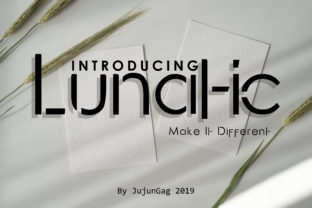
Lunatic Font: Where Bold Design Meets Futuristic Clarity
Imagine opening a design file and instantly feeling the pulse of something new—something that doesn’t just sit on the page but commands attention, signals innovation, and moves with confident rhythm. That’s the first impression Lunatic delivers. It’s not just another sans serif font. It’s a deliberate statement in typography: sharp, unapologetic, and built for the visual language of tomorrow.
A Typeface Designed for Impact, Not Just Legibility
At its core, Lunatic is a modern sans serif—but “modern” here means more than clean lines and neutral proportions. Its letterforms are sculpted with high-contrast terminals, tightly tuned spacing, and subtly geometric yet expressive curves. The uppercase “A” features a dramatic diagonal cut; the lowercase “g” uses a single-story form with a taut, almost mechanical loop; the “t” and “f” sport extended crossbars that hover just above the baseline like antennae scanning for signal. These aren’t decorative flourishes—they’re functional decisions that reinforce Lunatic’s identity as a font engineered for presence.
Unlike many contemporary sans serifs that prioritize neutrality or versatility above all else, Lunatic leans into personality. It doesn’t fade into the background. Instead, it anchors hierarchy—making headlines pop, interface labels feel intentional, and brand statements unmistakable. That makes it especially powerful in contexts where distinction matters: tech startups launching MVPs, creative studios rebranding for digital-first audiences, or motion designers building UI animations where every frame needs typographic weight.
Where Lunatic Fits in Real-World Projects
You won’t find Lunatic used for long-form editorial body text—and that’s by design. Its strength lies in controlled, high-impact applications:
- Digital interfaces: Dashboard headers, app onboarding screens, and call-to-action buttons benefit from Lunatic’s crisp letterfit and strong x-height. It scales cleanly across retina displays without losing definition—even at 14px in bold weights.
- Motion graphics & UI animation: Because each character has clear structural integrity and consistent stroke behavior, Lunatic holds up beautifully in After Effects or Figma Auto Layout transitions. Letters don’t wobble or distort during subtle scaling or tracking shifts.
- Branding systems: When paired with a restrained secondary typeface (like a warm, open humanist sans for body copy), Lunatic becomes the “voice” of a brand—confident, forward-looking, and precise. Think hardware brands launching AI-powered tools, or climate-tech platforms communicating urgency without alarmism.
- Print collateral with digital roots: Limited-run posters, exhibition signage, or packaging for digitally native products gain instant cohesion when Lunatic sets the tone. Its tight kerning and vertical stress translate powerfully to large-format printing.
It’s worth noting: Lunatic works best when given room to breathe. Overcrowding it with dense paragraph blocks or pairing it with overly ornate fonts dilutes its effect. Its power comes from contrast—not just typographic, but conceptual.
Weight, Width, and Practical Flexibility
Lunatic ships with a tightly curated range—typically six weights (Thin through Black) and matching italics, often with optional condensed variants. This isn’t an exhaustive superfamily, but a focused toolkit. Each weight feels like a natural extension of the same DNA: no sudden shifts in proportion or contrast between Light and Heavy. That consistency means designers can establish reliable visual rhythm across touchpoints without second-guessing how a headline will behave next to a caption.
The condensed versions deserve special mention. They’re not just squeezed versions of the regular width—they’re redrawn for optical balance. That means you can use Lunatic Condensed in tight navigation bars or narrow mobile cards without sacrificing legibility or impact. In fact, many UI designers report preferring the Condensed Black for status indicators or badge labels because the tighter shape creates a stronger visual “chunk.”
Technical Considerations for Developers & Designers
Integrating Lunatic into live projects is straightforward—but thoughtful implementation unlocks its full potential:
- Web performance: Host it via a reliable CDN or self-host the WOFF2 files. Its optimized outlines keep file sizes lean—usually under 40 KB per weight. Use
@font-facedeclarations withfont-display: swapto ensure fast fallbacks without layout shift. - CSS pairing: Leverage variable font axes if available (some versions support optical size or grade). For static files, combine weights purposefully: use Thin for delicate subheads, Medium for interactive elements, and Black for hero sections. Avoid stacking more than three weights in one layout—it fractures visual unity.
- Accessibility note: While Lunatic passes basic WCAG contrast thresholds at larger sizes, avoid using Thin or ExtraLight below 24px for critical UI text. Its low stroke contrast demands careful color planning—deep navy on off-white often works better than pure black on white for extended interface use.
- Figma & design systems: Import Lunatic as a local font or via the Fonts menu. Create text styles with explicit line-height ratios (1.25–1.35 for headings, 1.5 for supporting text) to maintain readability across devices.
Why Designers Choose Lunatic Over Alternatives
When evaluating fonts like Lunatic, teams often compare it to stalwarts such as Inter, Space Grotesk, or newer entrants like Manrope or Cera Pro. What sets Lunatic apart isn’t novelty alone—it’s intentionality. Inter excels in utility; Space Grotesk leans into retro-futurism; Manrope prioritizes screen readability. Lunatic fills a specific gap: high-impact clarity without coldness.
Its warmth comes from subtle humanist cues—the slight curve in the “a”, the organic taper on the “j” descender, the balanced asymmetry of the “S”. These details prevent it from feeling sterile, even at its boldest. That nuance matters when building trust: a fintech dashboard using Lunatic feels secure and innovative, not robotic. A wellness app using its Medium weight conveys precision without clinical detachment.
Getting Started the Right Way
If you’re exploring Lunatic for a project, start small. Try it in one high-visibility place first—like your website’s main headline or your app’s splash screen. Observe how users interact with it: Do CTAs get more clicks? Does time-on-page increase for sections using Lunatic headers? These real-world signals matter more than theoretical appeal.
Also consider licensing early. Lunatic is typically available under commercial licenses that cover web, desktop, and app use—but always verify scope before launch. Some versions include extended Latin, Greek, and Cyrillic support; others focus strictly on Western European languages. If your audience spans multiple regions, confirm glyph coverage matches your needs.
And remember: great typography isn’t about choosing the most striking font—it’s about choosing the one that serves your message *without distraction*. Lunatic does that by making boldness feel earned, not imposed. It doesn’t shout to be heard. It speaks clearly—and people listen.
Final Thought: Typography as Strategic Signal
In an era where attention is fragmented and authenticity is currency, type choices carry quiet but significant weight. Lunatic doesn’t pretend to be everything to everyone. It’s specialized. It’s opinionated. And precisely because of that, it helps brands and products say, “We know who we are—and what we stand for.” Whether you’re crafting a pitch deck for investors, designing a smart device’s firmware UI, or launching a speculative art installation, Lunatic offers a rare combination: futuristic energy grounded in typographic discipline. It’s not just a font you use. It’s one you align with.